
• Home
    • About
      • Feedback
      • Sitemap
      • Subscribe
    • Oracle
    • Forum
    • FB Status Updates
    • Advertise
    • Write for us
    • Contact
    • Privacy

    Bleeping Tech

      • Latest Stories

        What is new?

      • Five Ways to Begin Improving Your Author Rank

        May 15, 2013

      • Fix:Sleeping Dogs Bug | Mission Election | Escape the Building Problem

        May 15, 2013

      • Comments

        Most Recent

      • Trilma Rose on:

        Unable to Drag and Drop Widgets After WordPress 3.5 Upgrade?

      • Prabhjeet on:

        Unable to Drag and Drop Widgets After WordPress 3.5 Upgrade?

    • All Top
      • Top 5
      • Top 10
    • Android
      • Android Apps
    • iPhone
      • iPhone Apps
    • Blogging
      • WordPress
        • WordPress Plugins
      • Blogger
    • Gadget
    • Gaming
    • How-To-Guides
    • Internet
    • Tech News
    • SEO
    • softwares
      • Antivirus
      • Anti-Spyware

    Google Blocked Me:Unusual Traffic From Your Computer Network?

    0
    • by Trilma Rose
    • In google
    • — 4 Sep, 2012

    Google Blocked My IP Temporarily

    While trying to research on a particular topic on Chrome,I got a an unusual error message which in the first place freaked me out.I thought it could be a possible error with the website but i got the same message when i searched something on Google.After trying Firefox and Internet Explorer I came to a conclusion that it was an error message from Google itself

    googlemonster Google Blocked Me:Unusual Traffic From Your Computer Network?

    How To Solve ?
    “Our systems have detected unusual traffic from your computer network. Please try your request again later. Why did this happen?

    This page appears when Google automatically detects requests coming from your computer network which appear to be in violation of the Terms of Service. The block will expire shortly after those requests stop.

    This traffic may have been sent by malicious software, a browser plug-in, or a script that sends automated requests. If you share your network connection, ask your administrator for help — a different computer using the same IP address may be responsible. Learn more

    Sometimes you may see this page if you are using advanced terms that robots are known to use, or sending requests very quickly.

    IP address: xx.xxx.xxx.xx
    Time:2012-09-05T19:25:22Z“
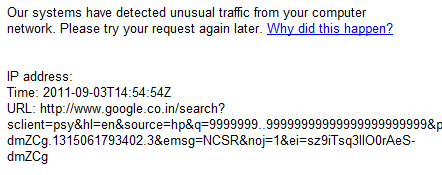
     Google Blocked Me:Unusual Traffic From Your Computer Network?

    First and foremost I checked the network activity and everything seemed to be alright.I also deleted browsing history,cache,site preferences,cookies.  

    The next step i did was to release and renew my ip address by going to CMD –>ipconfig/release and ipconfig/release and even this did not help.


    The reason behind this issue could be that my ISP is assigning the same IP address to many and someone on my network might be generating unusual traffic.Unfortunately Google might have thought it was my computer.

    Then I Ran a scan on the computer for possible infection using MalwareBytes Anti-malware  and found 2 infected registry files

    Finally I power-cycled my modem ( Turned it on and off) and then everything seemed to be normal.I was finally able to connect and browse


    Steps You Need To Follow


    Power-cycle the Modem 

    If you have an ADSL service,you can turn off the modem and then turn it back on Or If you have a cable Internet Service, Unplug the Ethernet cable from your router and plug it back in.This would renew your IP address and then you should not face any issues while browsing

    Disable or Remove Newly Installed Software or Add-ons

    There are chances that the browser add-ons or softwares could be generating unusual traffic.So try to disable the newly installed ones.

    Scan Your Computer For Infection.

    Unusual traffic may have been sent by a malicious software on the computer hence,Download and run Malwarebytes to clean all the infected files.

    Hide Your IP Address

    You can use free IP hider software’s on the computer to get rid of this issue.

    Let me know if the above steps helped you solve the problem.

     Google Blocked Me:Unusual Traffic From Your Computer Network?

    Trilma Rose

    My Bio goes beyond Studies .More precisely, I am a Part time blogger. My mission is simple, To connect with people and to help them.I love to learn and experiment and takes on any challenge that comes in my way.

    facebook Google Blocked Me:Unusual Traffic From Your Computer Network? twitter Google Blocked Me:Unusual Traffic From Your Computer Network? google plus Google Blocked Me:Unusual Traffic From Your Computer Network? youtube Google Blocked Me:Unusual Traffic From Your Computer Network? 

    Share this:

    • Facebook
    • Twitter
    • Google +1
    • StumbleUpon
    • Pinterest
    • Digg
    • Print

    Comments

    comments

    Share
    • Previous story Android Ice Cream Sandwich Battery Saving Tips
    • Next story Why You Should Pre-Order Your New iPhone 5 Early

    Leave a Reply Cancel reply

    Your email address will not be published. Required fields are marked *

    CAPTCHA Image
    Refresh Image

    *

    You may use these HTML tags and attributes: <a href="" title=""> <abbr title=""> <acronym title=""> <b> <blockquote cite=""> <cite> <code> <del datetime=""> <em> <i> <q cite=""> <strike> <strong>

    CommentLuv badgeShow more posts

    • Stay in touch

      Sign up for free updates

      • Recent Posts
      • Most Popular
      • Comments
      • google-author-rankFive Ways to Begin Improving Your Author RankMay 15, 2013
      • Sleeping-Dogs-Fix:Sleeping Dogs Bug | Mission Election | Escape the Building ProblemMay 15, 2013
      • adobe updaterHow to Stop Adobe Reader from Updating AutomaticallyMay 13, 2013
      • cloud developer apps5 Software Programs No Cloud Developer Should be WithoutMay 9, 2013
      • Best Budget Gaming PC Configuration Under $800 - May 2013Best Budget Gaming PC Configuration Under $800 – May 2013May 9, 2013
      • Hotspot Shield EliteGiveaway #4 : Hotspot Shield Elite worth $29.95 – Get Behind The Shield (Expired)November 3, 2012
      • giveawayGiveaway #1: Win 3 Zyma Unlimited Web Hosting AccountsSeptember 30, 2012
      • VPN Protection, Free! : Kepard to Give Away 10 Premium VPN Accounts at No ChargeVPN Protection, Free! : Kepard to Give Away 10 Premium VPN Accounts at No ChargeApril 27, 2013
      • Update Facebook Status via anythingJuly 7, 2012
      • 15 Free Alternatives to CO.CC – Free Doman Name Registration ServicesMarch 7, 2011
      • Trilma Rose on:Unable to Drag and Drop Widgets After WordPress 3.5 Upgrade?
      • Prabhjeet on:Unable to Drag and Drop Widgets After WordPress 3.5 Upgrade?
      • コーチバッグ on:10 Best Headphones For Nokia Lumia
      • Trilma Rose on:Remove Background From an Image Online
      • Irene Enriquez on:Remove Background From an Image Online
      • Recent Comments

        • Trilma Rose on Unable to Drag and Drop Widgets After WordPress 3.5 Upgrade?
        • Prabhjeet on Unable to Drag and Drop Widgets After WordPress 3.5 Upgrade?
        • コーチバッグ on 10 Best Headphones For Nokia Lumia
        • Trilma Rose on Remove Background From an Image Online
        • Irene Enriquez on Remove Background From an Image Online
      • About The Admin


        Trilma is a blogger from Mumbai, India. Her Idea is simple,To connect with people and to help them. Read More: My Google Profile

      © Copyright 2013 Bleeping Tech. Typegrid Theme by WPBandit.

      »
      «