• Home
    • About
      • Feedback
      • Sitemap
      • Subscribe
    • Contact
    • Advertise
    • Write for us
    • Privacy
    • Forum
    • Oracle
    • Fake FB Status
    • Free WP Installation

    Bleeping Tech

      • Latest Stories

        What is new?

      • Best DNS Services to Block Porn and Unwanted Sites without Software

        June 19, 2013

      • Fix: Issues Redirecting to WordPress via Blogger Mobile URL – html?m=1

        June 17, 2013

      • Comments

        Most Recent

      • Trilma Rose on:

        Windows 8 and Avast black screen problem |SOLVED

      • Maria Lynette on:

        Kick Start Your Business with Latest Business Apps

    • All Top
      • Top 5
      • Top 10
    • Android
      • Android Apps
    • iPhone
      • iPhone Apps
    • Blogging
      • WordPress
        • WordPress Plugins
      • Blogger
    • Gadget
    • Gaming
    • How-To-Guides
    • Internet
    • Tech News
    • SEO
    • softwares
      • Antivirus
      • Anti-Spyware

    Solution – Unable to Add Posts, Media or Arrange Widgets After WP 3.5 Upgrade

    7
    • by Trilma Rose
    • In How-To-Guides
    • — 14 Dec, 2012

    WordPress 3.5 was released on 12th Dec. After I upgraded to WP 3.5, Problems like adding posts, Media, Arranging Widgets started. At first i thought that it could be because of some plugins. hence, I deactivated most plugins and later all plugins at once but nothing worked. The second thing that came to my mind was the theme, hence i tried reverting back to the WordPress default theme but even that didn’t help. The only right thing i did was that i backed up my blog before upgrading to that latest version of WordPress.


    I asked for help from my fellow bloggers, but ‘Vignat Vora’ who has been my friend since i launched BleepingTech was the first to respond with a positive answer. His always willingness to help has really inspired me. He is a great guy don’t forget to visit his blog.


    Talking about the issues after upgrading to WP 3.5 , Vignat guided me to  WordPress support forum where ‘JoseVega’ a member had answered a similar question. Hence, i decided to follow the instructions and it worked like a charm.


    Are you also facing problems adding posts, media or widgets after upgrading to WordPress 3.5 ?


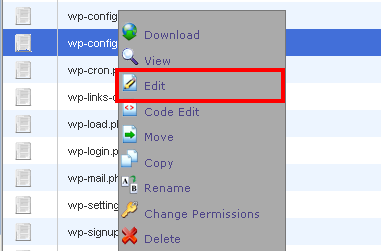
    Remember to take a backup of Wp-Config File.  You can find the file in Cpanel.

    Open the file and add the below code at the end and save changes.


    wp config file Solution   Unable to Add Posts, Media or Arrange Widgets After WP 3.5 Upgrade


    Source codecode Solution   Unable to Add Posts, Media or Arrange Widgets After WP 3.5 Upgrade printer Solution   Unable to Add Posts, Media or Arrange Widgets After WP 3.5 Upgrade info Solution   Unable to Add Posts, Media or Arrange Widgets After WP 3.5 Upgrade 
    define('CONCATENATE_SCRIPTS', false );
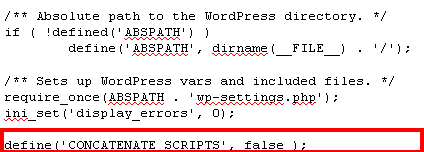
     

    Code Solution   Unable to Add Posts, Media or Arrange Widgets After WP 3.5 Upgrade


    This should fix the problem as it worked for me and many others. Do try it and let me know as well. If you found this post useful, do share and help others as well.

    If this doesn’t work for you please follow this article:  Unable to Drag and Drop Widgets After WordPress 3.5 Update

     Solution   Unable to Add Posts, Media or Arrange Widgets After WP 3.5 Upgrade

    Trilma Rose

    My Bio goes beyond Studies .More precisely, I am a Part time blogger. My mission is simple, To connect with people and to help them.I love to learn and experiment and takes on any challenge that comes in my way.

    facebook Solution   Unable to Add Posts, Media or Arrange Widgets After WP 3.5 Upgrade twitter Solution   Unable to Add Posts, Media or Arrange Widgets After WP 3.5 Upgrade google plus Solution   Unable to Add Posts, Media or Arrange Widgets After WP 3.5 Upgrade youtube Solution   Unable to Add Posts, Media or Arrange Widgets After WP 3.5 Upgrade 

    Enter Your Mail Address

    Shortlink for this post: http://wp.me/p2K0ed-JA

    Share this:

    • Facebook
    • Twitter
    • Google +1
    • StumbleUpon
    • Pinterest
    • Digg
    • Print

    Comments

    comments

    Share

    Tags: SEO Tips

    • Previous story Motorola Electrify 2: Is this an electric find for Motorola fans?
    • Next story Tips to Promote Your Online Business with Blogging

    You may also like...

    • How to optimize landing page for SEO How to optimize landing page for SEO23 Mar, 2013
    • How to add live chat to wordpress10 Feb, 2011
    • tomb raider 2013 How I Solved Tomb Raider Bug: Killing Father Mathias – 201328 May, 2013
    • Ways to Keep Your Mac Lasts Forever Ways to Keep Your Mac Lasts Forever23 Dec, 2012

    7 Comments

    1. Renjiv Raman says:
      December 16, 2012 at 7:41 am

      Works like a charm..You rock buddy..

      Reply
      • Anish Sangamam says:
        December 19, 2012 at 6:16 pm

        Thanks buddy

        Reply
    2. Dave says:
      January 16, 2013 at 6:01 am

      Best fix ever! Thank you so much!

      Reply
    3. jimy says:
      January 30, 2013 at 11:22 pm

      That did not work for me. I am using ‘Morning’ theme. Is there anything more that I could try? Thank you.

      Reply
      • Anish Sangamam says:
        February 1, 2013 at 7:29 pm

        May be the theme is not compatible and requires an update. Try to contact the theme developer

        Reply
    4. Tah says:
      February 10, 2013 at 11:05 pm

      I am also having the same problem.
      Your code did not work foor me either. I am new to this. Could you please provide code that I can copy and paste into wp-config.php? it may sound stupid I am not sure about spacing and I think maybe it it is because of that.

      Reply
      • Anish Sangamam says:
        February 11, 2013 at 4:10 pm

        @Tah Try to follow this post : http://www.bleepingtech.com/unable-to-drag-and-drop-widgets-after-wordpress-3-5-upgrade/

        Let me know your feedback and if it works, Kindly share. It would really help others and BleepingTech

        Reply

    Leave a Reply Cancel reply

    Your email address will not be published. Required fields are marked *

    CAPTCHA Image
    Refresh Image

    *

    You may use these HTML tags and attributes: <a href="" title=""> <abbr title=""> <acronym title=""> <b> <blockquote cite=""> <cite> <code> <del datetime=""> <em> <i> <q cite=""> <strike> <strong>

    CommentLuv badgeShow more posts

    • Stay in touch

      Sign up for free updates

      • Recent Posts
      • Most Popular
      • Comments
      • Block porn using dns servicesBest DNS Services to Block Porn and Unwanted Sites without SoftwareJune 19, 2013
      • 50-Cool-and-Creative-404-Error-Pages-25Fix: Issues Redirecting to WordPress via Blogger Mobile URL – html?m=1June 17, 2013
      • Top 10 free public DNS10 Free Fast Public DNS Servers To Increase Internet Speed – 2013June 15, 2013
      • PDF to Excel Free OnlineFree and Simple PDF to Excel Conversion – Online ToolJune 13, 2013
      • nokia_lumia_800_white_live_sg_8Turn off Auto Spelling Correction / Predictive Text in Messages: LumiaJune 10, 2013
      • Hotspot Shield EliteGiveaway #4 : Hotspot Shield Elite worth $29.95 – Get Behind The Shield (Expired)November 3, 2012
      • VPN Protection, Free! : Kepard to Give Away 10 Premium VPN Accounts at No ChargeVPN Protection, Free! : Kepard to Give Away 10 Premium VPN Accounts at No ChargeApril 27, 2013
      • giveawayGiveaway #1: Win 3 Zyma Unlimited Web Hosting AccountsSeptember 30, 2012
      • Update Facebook Status via anythingJuly 7, 2012
      • 15 Free Alternatives to CO.CC – Free Doman Name Registration ServicesMarch 7, 2011
      • Trilma Rose on:Windows 8 and Avast black screen problem |SOLVED
      • Maria Lynette on:Kick Start Your Business with Latest Business Apps
      • aliRW on:Windows 8 and Avast black screen problem |SOLVED
      • Trilma Rose on:Export /Save the Email IDs of All Your Facebook Friends
      • Trilma Rose on:Update Facebook Status via anything
    • Recent Comments

      • Trilma Rose on Windows 8 and Avast black screen problem |SOLVED
      • Maria Lynette on Kick Start Your Business with Latest Business Apps
      • aliRW on Windows 8 and Avast black screen problem |SOLVED
      • Trilma Rose on Export /Save the Email IDs of All Your Facebook Friends
      • Trilma Rose on Update Facebook Status via anything
    • About The Admin


      Trilma is a blogger from Mumbai, India. Her Idea is simple,To connect with people and to help them. Read More: My Google Profile
    • All Top
      • Top 5
      • Top 10
    • Android
      • Android Apps
    • iPhone
      • iPhone Apps
    • Blogging
      • WordPress
        • WordPress Plugins
      • Blogger
    • Gadget
    • Gaming
    • How-To-Guides
    • Internet
    • Tech News
    • SEO
    • softwares
      • Antivirus
      • Anti-Spyware

    © Copyright 2013 Bleeping Tech. Typegrid Theme by WPBandit.

    »
    «