• Home
    • About
      • Feedback
      • Sitemap
      • Subscribe
    • Oracle
    • Forum
    • FB Status Updates
    • Advertise
    • Write for us
    • Contact
    • Privacy

    Bleeping Tech

      • Latest Stories

        What is new?

      • Five Ways to Begin Improving Your Author Rank

        May 15, 2013

      • Fix:Sleeping Dogs Bug | Mission Election | Escape the Building Problem

        May 15, 2013

      • Comments

        Most Recent

      • Trilma Rose on:

        Unable to Drag and Drop Widgets After WordPress 3.5 Upgrade?

      • Prabhjeet on:

        Unable to Drag and Drop Widgets After WordPress 3.5 Upgrade?

    • All Top
      • Top 5
      • Top 10
    • Android
      • Android Apps
    • iPhone
      • iPhone Apps
    • Blogging
      • WordPress
        • WordPress Plugins
      • Blogger
    • Gadget
    • Gaming
    • How-To-Guides
    • Internet
    • Tech News
    • SEO
    • softwares
      • Antivirus
      • Anti-Spyware

    Share Banned / Blocked Websites on Facebook – Pwn Zuck

    2
    • by Trilma Rose
    • In Facebook · How-To-Guides
    • — 17 Feb, 2013

    I was chatting on Facebook with my friend. I wanted to share a link  from a *certain* website with him. I pasted the link on the chat window and tried to send it across. Surprisingly, I got this error:  “The content you’re trying to share includes a link that’s been blocked for being spammy or unsafe”
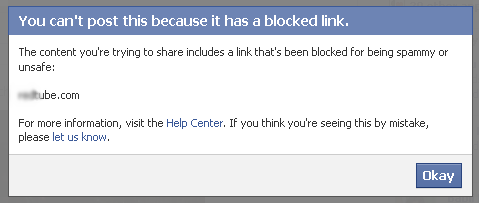
     

    blocked Share Banned / Blocked Websites on Facebook   Pwn Zuck


    It was a popular website, I wondered why Facebook would block it.  I tried to shorten the URL via a service like bit.ly or tinyurl.com, hoping it would fool Facebook but they use automatic forwarding. Facebook detected it and again blocked me from posting the link.


    I ended up hacking the URL to something illegible just so that Facebook wouldn’t bug me anymore. Eg. http:// my bannedwebsite . com


    This is unintuitive and doesn’t encourage your friends to click it. Facebook blocks several popular websites for reasons ranging from porn to marketing and many other reasons in between. The worst part about this ban is that, forget posting a banned website as a status, you cannot even share it as a private message with your friends.


    This is where pwnzuck.com steps in. It allows you to share banned websites on Facebook. Banned links shared via ‘pwnzuck’ are not detected by Facebook and allowed to go through.


    Here is how to bypass Facebook censorship and ‘pwn zuckerberg’ in the process.


    Step 1:  Copy the url you want to share

    Step 2:  Visit www.pwnzuck.com

    Step 3: Paste the url in the text box. Hit ‘pwn zuck’ button.

    Step 4: Copy the shortened url. It will be like this – http://pwnzuck.com/xx where ‘xx’ is a number.

    Step 5: Paste the new url in Facebook as a status or as a private message. Your friends can see the title, description, preview photo as if it was a normal link.


    If you have any suggestions for Pwn Zuck,  Contact the admin of PwnZuck via the contact page or follow him on Twitter @PwnZuck


    Disclaimer: This is not a hacking tutorial. This tutorial is just to make people aware that even though Facebook has blocked  ‘n’  number of websites , its of no use and the same blocked link can be easily shared without any hassles.


     Share Banned / Blocked Websites on Facebook   Pwn Zuck

    Trilma Rose

    My Bio goes beyond Studies .More precisely, I am a Part time blogger. My mission is simple, To connect with people and to help them.I love to learn and experiment and takes on any challenge that comes in my way.

    facebook Share Banned / Blocked Websites on Facebook   Pwn Zuck  twitter Share Banned / Blocked Websites on Facebook   Pwn Zuck  google plus Share Banned / Blocked Websites on Facebook   Pwn Zuck  youtube Share Banned / Blocked Websites on Facebook   Pwn Zuck  

    Share this:

    • Facebook
    • Twitter
    • Google +1
    • StumbleUpon
    • Pinterest
    • Digg
    • Print

    Comments

    comments

    Share
    • Previous story Top 5 wi-fi Calling Apps for your Android Phone or Tablet
    • Next story What is a Code Signing Certificate?

    2 Comments

    1. Parigyan says:
      February 17, 2013 at 11:46 am

      Heya Anish ! Thanks for sharing this amazing trick ! Will try it out soon !

      Reply
      • Anish Sangamam says:
        February 18, 2013 at 3:16 pm

        My pleasure Pari. Glad you liked it

        Reply

    Leave a Reply Cancel reply

    Your email address will not be published. Required fields are marked *

    CAPTCHA Image
    Refresh Image

    *

    You may use these HTML tags and attributes: <a href="" title=""> <abbr title=""> <acronym title=""> <b> <blockquote cite=""> <cite> <code> <del datetime=""> <em> <i> <q cite=""> <strike> <strong>

    CommentLuv badgeShow more posts

    • Stay in touch

      Sign up for free updates

      • Recent Posts
      • Most Popular
      • Comments
      • google-author-rankFive Ways to Begin Improving Your Author RankMay 15, 2013
      • Sleeping-Dogs-Fix:Sleeping Dogs Bug | Mission Election | Escape the Building ProblemMay 15, 2013
      • adobe updaterHow to Stop Adobe Reader from Updating AutomaticallyMay 13, 2013
      • cloud developer apps5 Software Programs No Cloud Developer Should be WithoutMay 9, 2013
      • Best Budget Gaming PC Configuration Under $800 - May 2013Best Budget Gaming PC Configuration Under $800 – May 2013May 9, 2013
      • Hotspot Shield EliteGiveaway #4 : Hotspot Shield Elite worth $29.95 – Get Behind The Shield (Expired)November 3, 2012
      • giveawayGiveaway #1: Win 3 Zyma Unlimited Web Hosting AccountsSeptember 30, 2012
      • VPN Protection, Free! : Kepard to Give Away 10 Premium VPN Accounts at No ChargeVPN Protection, Free! : Kepard to Give Away 10 Premium VPN Accounts at No ChargeApril 27, 2013
      • Update Facebook Status via anythingJuly 7, 2012
      • 15 Free Alternatives to CO.CC – Free Doman Name Registration ServicesMarch 7, 2011
      • Trilma Rose on:Unable to Drag and Drop Widgets After WordPress 3.5 Upgrade?
      • Prabhjeet on:Unable to Drag and Drop Widgets After WordPress 3.5 Upgrade?
      • コーチバッグ on:10 Best Headphones For Nokia Lumia
      • Trilma Rose on:Remove Background From an Image Online
      • Irene Enriquez on:Remove Background From an Image Online
      • Recent Comments

        • Trilma Rose on Unable to Drag and Drop Widgets After WordPress 3.5 Upgrade?
        • Prabhjeet on Unable to Drag and Drop Widgets After WordPress 3.5 Upgrade?
        • コーチバッグ on 10 Best Headphones For Nokia Lumia
        • Trilma Rose on Remove Background From an Image Online
        • Irene Enriquez on Remove Background From an Image Online
      • About The Admin


        Trilma is a blogger from Mumbai, India. Her Idea is simple,To connect with people and to help them. Read More: My Google Profile

      © Copyright 2013 Bleeping Tech. Typegrid Theme by WPBandit.

      »
      «